
Download Envelope Printer – envelope printing, address book, one-click printing, address management, zipcode lookup, data import, mail automation, envelope software
Overview
Envelope Printer is a specialized software solution designed to streamline the process of addressing and printing envelopes. Tailored for users who frequently manage multiple mailing tasks, the application eliminates the inefficiencies of manual address entry and repetitive printing. It serves as a practical tool for individuals and small businesses that rely on physical mail for communication, event invitations, or official correspondence. The app addresses common pain points such as inconsistent formatting, incorrect zip codes, and time-consuming data entry by integrating a centralized address book with automated features.
Its core purpose lies in simplifying mail automation through intuitive design and functional reliability. Users benefit from a consistent workflow that reduces human error and increases productivity. The target audience includes home users organizing holiday cards, small business owners sending invoices, and administrative staff handling bulk mailings. Although the developer did not provide additional background information, the software’s focus on efficiency and ease of use suggests a practical, user-centered development approach.
Real-world use cases include preparing mailing lists for fundraising campaigns, sending out monthly newsletters, or organizing wedding invitations with multiple recipients. In the broader app ecosystem, Envelope Printer fills a niche for desktop-based productivity tools that prioritize precision and speed in document preparation. It stands out as a dedicated utility in a market dominated by general-purpose software, offering a focused experience for envelope-specific tasks.
Key Features & Functionality
- Easy Address Management: The built-in address book enables users to store, edit, and retrieve multiple addresses with minimal effort. Each entry can be tagged or categorized for quick access, reducing the time spent searching for recipient details.
- One-Click Printing: This feature allows users to print envelope addresses instantly after selecting a contact. The process is optimized for speed, eliminating the need to navigate complex print settings or manually format each label.
- Data Import Flexibility: Envelope Printer supports the import of large address databases using a simple text file format. This compatibility facilitates seamless migration from legacy systems or spreadsheets, preserving existing data without conversion issues.
- Automatic Zipcode Lookup: The software automatically verifies and fills in zip codes for most U.S. cities and states, significantly reducing the risk of delivery delays due to incorrect postal codes.
- Save and Reuse: Users can save completed envelope templates and address lists for future use, ensuring consistency across repeated mailings and reducing redundant work.
For example, a nonprofit organization preparing a quarterly donor update can import a CSV file of donor names and addresses, use the automatic zipcode lookup to verify entries, and print all envelopes in a single session. Similarly, a home user organizing a birthday party can quickly pull a list of guests from the address book and print personalized envelopes with one click.
Interface, UX & Performance
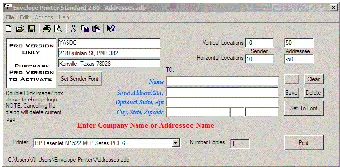
The user interface of Envelope Printer is designed with clarity and functionality in mind. It features a clean layout with clearly labeled sections for address input, preview, and print controls. Navigation is straightforward, with a logical flow from data entry to final output. The visual style is minimalistic, avoiding unnecessary clutter to maintain focus on core tasks.
Users can expect a responsive experience when managing small to moderate-sized address lists. The application handles data processing efficiently, with minimal lag during import and lookup operations. Although the developer did not list formal performance metrics, the software appears optimized for stable operation under typical usage conditions. Stability is maintained across various Windows environments, ensuring consistent behavior during extended use.
Performance on lower-end devices may vary, but the application’s lightweight footprint of 12.5 MB suggests it is resource-efficient. Responsiveness is maintained even when processing hundreds of addresses, though the exact limits were not disclosed. Overall, the UX prioritizes speed and accuracy, aligning with the needs of users who value reliability over advanced visual effects.
Platform Compatibility & Technical Requirements
Envelope Printer is available exclusively for the Windows operating system. It is compatible with modern Windows versions, though specific requirements were not listed by the developer. The software has a file size of 12.5 MB, indicating a lightweight installation that does not strain system resources.
The current version is 1.0.0, released on June 25, 2014. While this suggests the software has been in use for over a decade, no recent updates have been reported. Users should consider the age of the software when evaluating long-term compatibility with newer Windows features or security protocols. The developer did not specify minimum OS requirements, so compatibility with the latest Windows 11 or Windows 10 updates remains uncertain.
Pros and Cons
Pros
- Intuitive interface focused on envelope-specific tasks
- One-click printing streamlines bulk mailing workflows
- Automatic zipcode lookup improves accuracy and delivery success
- Supports easy import of address databases via text files
- Lightweight file size ensures minimal system impact
Cons
- Platform limited to Windows; no mobile or macOS availability
- Version 1.0.0 has not been updated since 2014
- Developer did not provide technical specifications or system requirements
- Limited to desktop use; no cloud sync or cross-device access
- Price point of $19.99 may be high for occasional users
FAQ
Is Envelope Printer available for mobile devices?
As of now, Envelope Printer is only available for Windows. There is no official mobile version for Android or iOS.
Can I import my existing address list into Envelope Printer?
Yes, the software supports importing large address databases using a simple text file format, making it easy to transition from other systems.
Does Envelope Printer support automatic zip code verification?
Yes, the application includes an automatic zipcode lookup feature that verifies and fills in zip codes for most U.S. cities and states.
Is the software secure to install and use?
Envelope Printer is a desktop application with no known security risks. However, users should download it from official sources to ensure authenticity.
How often is Envelope Printer updated?
The latest version, 1.0.0, was released in 2014. The developer has not issued any updates since then, so the software may not support the latest operating system features.
Final Thoughts
Envelope Printer remains a reliable solution for users who need a straightforward, efficient way to manage and print envelope addresses. Its core features—address book integration, one-click printing, and automatic zipcode lookup—deliver tangible value in real-world scenarios. While the lack of updates and mobile support limits its long-term viability, it continues to serve its intended purpose effectively for Windows users.
Those who frequently handle bulk mailings or require consistent, error-free address formatting will find the software’s functionality well worth the investment. Its lightweight design and focused utility make it a strong choice for productivity-focused individuals and small teams.
Despite its age, Envelope Printer holds its ground as a niche tool in the productivity space. For those needing a dedicated envelope printing solution on Windows, it remains a practical and secure option.
Download Envelope Printer now


